Daisy - University of Washington IT
Daisy - University of Washington IT
Scheduling Simplified, Service Amplified
Scheduling Simplified, Service Amplified
Case Study
Case Study
5 min read
5 min read


Project Overview
Project Overview
Project Overview
As an IT Consultant at the University of Washington, I identified a critical opportunity to address fundamental value conflicts in our daily operations. The scheduling system wasn't just inefficient, it undermined student autonomy, disrespected both students' and supervisors' time, and prevented fair task distribution across teams.
Going beyond my regular responsibilities, I volunteered to redesign the system through a value sensitive design approach, driven by the daily challenges I observed and experienced firsthand.
As an IT Consultant at the University of Washington, I identified a critical opportunity to address fundamental value conflicts in our daily operations. The scheduling system wasn't just inefficient, it undermined student autonomy, disrespected both students' and supervisors' time, and prevented fair task distribution across teams.
Going beyond my regular responsibilities, I volunteered to redesign the system through a value sensitive design approach, driven by the daily challenges I observed and experienced firsthand.
As an IT Consultant at the University of Washington, I identified a critical opportunity to address fundamental value conflicts in our daily operations. The scheduling system wasn't just inefficient, it undermined student autonomy, disrespected both students' and supervisors' time, and prevented fair task distribution across teams.
Going beyond my regular responsibilities, I volunteered to redesign the system through a value sensitive design approach, driven by the daily challenges I observed and experienced firsthand.
Role
Role
Role
Full Stack Designer
Full Stack Designer
Full Stack Designer
Tools
Tools
Tools
Figma
Figma
Figma
Timeline
Timeline
Timeline
4 Weeks
4 Weeks
4 Weeks
Dec (2024) - Jan (2025)
Dec (2024) - Jan (2025)
Dec (2024) - Jan (2025)
Skills
Skills
Skills
Product Design
Product Design
Product Design
Interaction Design
Interaction Design
Interaction Design
User Research
User Research
User Research
Our scheduling system Daisy offers basic schedule viewing. However its lack of features and poor mobile experience create unnecessary barriers for two specific groups of employees.

Current Interface
Current Interface
Student employees,
face three critical scheduling challenges:
A desktop-only interface
Manual email shift submission process
Six distinct clicks to view their daily schedule
Supervisors,
encounter two significant system limitations:
Must manually process schedules for 20+ students
Must create workarounds to monitor staff and tasks
Direct Stakeholders
UW IT's scheduling system Daisy directly affects two primary stakeholder groups:
student employees: value autonomy and work-life balance
supervisors: value efficiency and fairness in task distribution.
Current Interface
Student employees,
the system's most frequent users, value autonomy in managing their schedules and work-life balance that depends on reliable, accessible schedule information.
But,
they face three critical scheduling challenges:
A desktop-only interface
Manual email shift submission process
Six distinct clicks to view their daily schedule
Supervisors,
value efficiency and fairness in distributing shifts and tasks across their teams
But,
they encounter two significant system limitations:
Must manually process schedules for 20+ students
Must create workarounds to monitor staff and tasks
Mobile-First Redesign
60% of employees attempt mobile access despite poor usability. The redesign prioritizes touch optimization, enhanced readability, and simplified information to create an intuitive mobile experience.

Streamlined Submission Portal
Eliminating email-based scheduling saves supervisors 56 hours quarterly. The digital submission process transforms manual workflows with visual scheduling tools, smart status tracking, and streamlined one-click submissions.
In-Direct Stakeholders
Daisy also in-directly affects two groups:
Other IT staff who depend on accurate coverage
End users/callers who experience service quality based on staffing
Student View: Everything at a Glance
Mobile-First Redesign
66% of students check schedules daily. The new dashboard transforms a six-click process into a single view, showing current shifts, team coverage, task details, and weekly schedule with one-swipe access.
60% of employees attempt mobile access despite poor usability. The redesign prioritizes touch optimization, enhanced readability, and simplified information to create an intuitive mobile experience.
Student View: Everything at a Glance
66% of students check schedules daily. The new dashboard transforms a six-click process into a single view, showing current shifts, team coverage, task details, and weekly schedule with one-swipe access.
Streamlined Submission Portal
Eliminating email-based scheduling saves supervisors 56 hours quarterly. The digital submission process transforms manual workflows with visual scheduling tools, smart status tracking, and streamlined one-click submissions.
Supervisor Command Center
Instead of spreadsheets Supervisors can now quickly spot coverage gaps, monitor task distribution, and manage schedule requests. Additionally, the right-panel action center turns what was once a 15-minute email process into a 15-second decision.

THE CHALLENGE
How can I modernize UW IT's scheduling system to support student autonomy and work-life balance while respecting supervisors' time and enabling fair task distribution?
How can I modernize UW IT's scheduling system to support student autonomy and work-life balance while respecting supervisors' time and enabling fair task distribution?
How can I modernize UW IT's scheduling system to support student autonomy and work-life balance while respecting supervisors' time and enabling fair task distribution?
THE HIGH-LEVEL GOALS THAT DEFINED MY DESIGN
THE HIGH-LEVEL GOALS THAT DEFINED MY DESIGN
THE HIGH-LEVEL GOALS THAT DEFINED MY DESIGN
Support autonomy through accessible, mobile-first design
Respect time by transforming email-based processes into digital workflows
Enable fairness through clear schedule visibility across all roles
Daisy Reimagined
Daisy Reimagined
Daisy Reimagined
A mobile-optimized platform, transforming fragmented email workflows and schedule visibility into a seamless digital experience.
Supporting student autonomy through accessible design
60% of employees attempted mobile access despite poor usability, revealing how critical mobile access was to their sense of autonomy.
The redesign prioritizes touch optimization, enhanced readability, and simplified information hierarchy to enable students to manage their schedules independently.
By removing the dependency on desktop access, the mobile-first design respects students' need for flexibility and self-sufficiency, core values for balancing work with academic life.

Visualizable data
Minimum of 16 px from screen edge
Bottom nav bar (64px)
Typography Hierarchy
Visual Feedback for interactions
Minimum readable text size (12px)
Touchpoints 44x44pt
High Contrast Ratios (4.5:1)
Respecting time and enabling fair oversight
The email-based submission process consumed 56 hours quarterly. This is time supervisors could have spent supporting their teams or ensuring equitable shift distribution.
By transforming this manual workflow into a digital submission portal with visual scheduling tools, smart status tracking, and one-click approvals, the redesign respects supervisors' time as a valuable resource.
More importantly, it enables them to uphold their value of fairness: with real-time visibility into coverage gaps and workload distribution, supervisors can make informed, equitable decisions about who works when, rather than scrambling to process emails and losing sight of the bigger picture.
Empowering work-life balance through clarity and predictability
66% of students checked their schedules daily. This is evidence of how critical schedule visibility was to planning their lives around work.
The original six-click process created unnecessary friction, undermining their ability to quickly assess their commitments.
The redesigned dashboard transforms this into a single view with one-swipe access to current shifts, team coverage, task details, and weekly schedules.
This design supports work-life balance by giving students the predictability they need to plan around classes, study time, and personal commitments. Clear, accessible information respects their time and reduces the cognitive load of navigating a clunky interface.
Enabling fairness through transparency and efficiency
Supervisors value fairness in distributing shifts and tasks across 20+ students, but the old system made it nearly impossible to see the full picture without manually reviewing spreadsheets.
The Supervisor Command Center provides at-a-glance visibility into coverage gaps, task distribution, and schedule requests, enabling supervisors to make equitable decisions based on real data rather than guesswork. The right-panel action center transforms a 15-minute email approval process into a 15-second decision, respecting supervisors' time while maintaining accountability. With transparent, real-time information, supervisors can uphold their commitment to fairness and ensure no student is overburdened while others are underutilized.
Quick stats showing coverage needs and peak hours
Coverage gaps highlighted in red
Tasks assignments visible at a glace
Real-time approval system for schedule request
Staff distribution clearly visualized by time slots
BACKGROUND
A System in Crisis
A System in Crisis
A System in Crisis
As an IT Consultant at UW, I encountered persistent complaints about our scheduling system from hundreds of employees. This pattern of feedback signaled a critical opportunity to transform an outdated system that was actively hindering productivity and causing unnecessary stress.
Their frustrations were clear:
As an IT Consultant at UW, I encountered persistent complaints about our scheduling system from hundreds of employees. This pattern of feedback signaled a critical opportunity to transform an outdated system that was actively hindering productivity and causing unnecessary stress.
Their frustrations were clear:
As an IT Consultant at UW, I encountered persistent complaints about our scheduling system from hundreds of employees. This pattern of feedback signaled a critical opportunity to transform an outdated system that was actively hindering productivity and causing unnecessary stress.
Their frustrations were clear:

"Jeez the view is so outdated and cluttered"
"I spend so many hours copying and pasting schedules from emails."
"The schedule is so bland and old making it hard to read"
"Jeez the view is so outdated and cluttered"
"Jeez the view is so outdated and cluttered"
"I spend so many hours copying and pasting schedules from emails."
"The schedule is so bland and old making it hard to read"
RESEARCH
Value-Oriented Semi-Structured Interviews
Value-Oriented Semi-Structured Interviews
Value-Oriented Semi-Structured Interviews
To translate complaints into actionable solutions, I conducted structured research with 5 in-depth interviews and 20+ surveys across both supervisors and student employees. This mixed-methods approach revealed clear patterns of frustration while highlighting specific opportunities for meaningful intervention.
To translate complaints into actionable solutions, I conducted structured research with 5 in-depth interviews and 20+ surveys across both supervisors and student employees. This mixed-methods approach revealed clear patterns of frustration while highlighting specific opportunities for meaningful intervention.
To translate complaints into actionable solutions, I conducted structured research with 5 in-depth interviews and 20+ surveys across both supervisors and student employees. This mixed-methods approach revealed clear patterns of frustration while highlighting specific opportunities for meaningful intervention.
Interviews + Surveys addressing:
User behavior and interaction frequency
Specific pain points in the workflow
Satisfaction levels across different roles
Priority areas for improvement
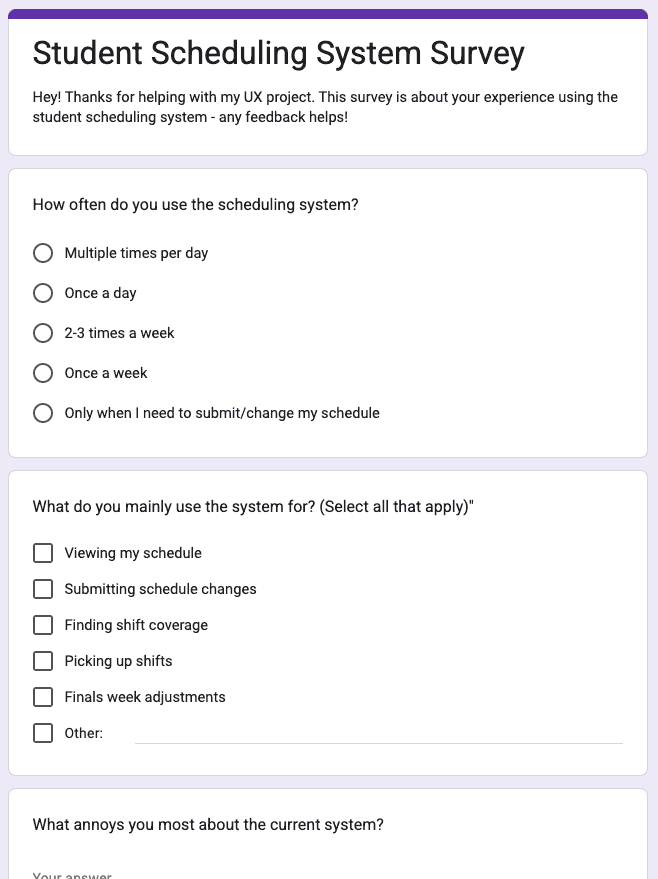


Through these interviews, I identified several core values at stake: students valued autonomy and work-life balance, expressing frustration when the system forced them to depend on supervisors for basic information. Supervisors valued efficiency and fairness, noting that manual processes consumed time that could be spent on higher-value work.
Through these interviews, I identified several core values at stake: students valued autonomy and work-life balance, expressing frustration when the system forced them to depend on supervisors for basic information. Supervisors valued efficiency and fairness, noting that manual processes consumed time that could be spent on higher-value work.
Through these interviews, I identified several core values at stake: students valued autonomy and work-life balance, expressing frustration when the system forced them to depend on supervisors for basic information. Supervisors valued efficiency and fairness, noting that manual processes consumed time that could be spent on higher-value work.
RESEARCH
Feature Prioritization
Feature Prioritization
Feature Prioritization
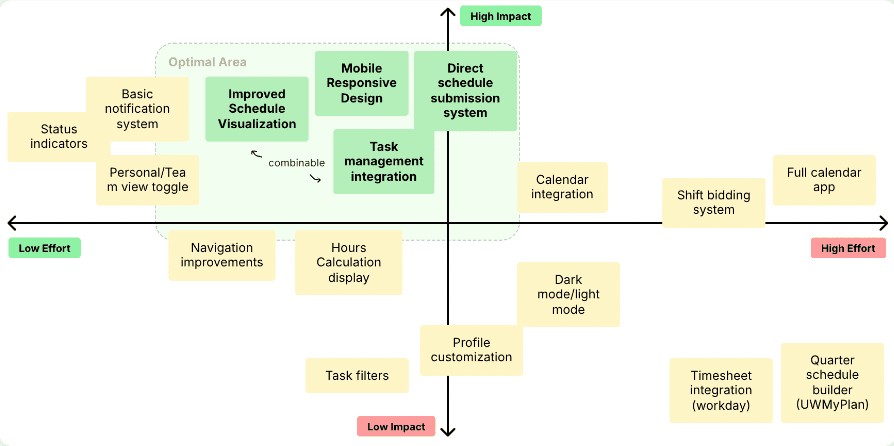
With data in hand, I synthesized findings to identify actionable opportunities. Using an impact-effort matrix, I prioritized solutions that would create the most value while remaining feasible
With data in hand, I synthesized findings to identify actionable opportunities. Using an impact-effort matrix, I prioritized solutions that would create the most value while remaining feasible
With data in hand, I synthesized findings to identify actionable opportunities. Using an impact-effort matrix, I prioritized solutions that would create the most value while remaining feasible
Optimal Area
combinable
Navigation improvements
Hours Calculation display

Low Impact
Status indicators
High Impact
Low Effort

High Effort
Mobile Responsive Design
Task management integration
Calendar integration
Improved Schedule Visualization
Basic notification system
Personal/Team view toggle
Shift bidding system
Full calendar app
Timesheet integration (workday)
Profile customization
Task filters
Dark mode/light mode
Quarter schedule builder (UWMyPlan)
Direct schedule submission system
RESEARCH
Three Critical Problems
Three Critical Problems
Three Critical Problems
Through research synthesis, I identified three essential features that would transform daily workflows based on user needs, pain points, and stakeholder impact:
Through research synthesis, I identified three essential features that would transform daily workflows based on user needs, pain points, and stakeholder impact:
Through research synthesis, I identified three essential features that would transform daily workflows based on user needs, pain points, and stakeholder impact:
#1
#1
#1
Mobile Experience
Mobile Experience
Mobile Experience
Compelling findings made mobile experience my top priority. The data revealed:
Compelling findings made mobile experience my top priority. The data revealed:
Compelling findings made mobile experience my top priority. The data revealed:
User Needs
User Needs
User Needs
Clear, readable schedule display on mobile devices
Efficient navigation without constant zooming and scrolling
Modern, mobile-first interface design
Clear, readable schedule display on mobile devices
Efficient navigation without constant zooming and scrolling
Modern, mobile-first interface design
Clear, readable schedule display on mobile devices
Efficient navigation without constant zooming and scrolling
Modern, mobile-first interface design
Pain-points
Pain-points
Pain-points
Cluttered time blocks are unreadable on small screens
Users forced to zoom and scroll horizontally
Made without a mobile-first approach
Cluttered time blocks are unreadable on small screens
Users forced to zoom and scroll horizontally
Made without a mobile-first approach
Cluttered time blocks are unreadable on small screens
Users forced to zoom and scroll horizontally
Made without a mobile-first approach
Quote
Quote
Quote
“The formatting and the interface of the scheduling system is sometimes hard to read and understand what times I or others start our shifts” - Student Employee
“The formatting and the interface of the scheduling system is sometimes hard to read and understand what times I or others start our shifts” - Student Employee
“The formatting and the interface of the scheduling system is sometimes hard to read and understand what times I or others start our shifts” - Student Employee
Impact/Affected:
Impact/Affected:
Impact/Affected:
60% of students attempt mobile view although the poor experience
60% of students attempt mobile view although the poor experience
60% of students attempt mobile view although the poor experience
Current Interface
Current Interface
#2
#2
#2
Manual Schedule Submission
Manual Schedule Submission
Manual Schedule Submission
The email-based schedule submission process emerged as my second priority, with research highlighting these key points:
The email-based schedule submission process emerged as my second priority, with research highlighting these key points:
The email-based schedule submission process emerged as my second priority, with research highlighting these key points:
User Needs
User Needs
User Needs
Streamlined digital submission process to replace email workflow
Clear submission guidelines and format standards
Automated validation to prevent common errors and resubmissions
Streamlined digital submission process to replace email workflow
Clear submission guidelines and format standards
Automated validation to prevent common errors and resubmissions
Streamlined digital submission process to replace email workflow
Clear submission guidelines and format standards
Automated validation to prevent common errors and resubmissions
Pain-points
Pain-points
Pain-points
100% email-based submissions
Extremely tedious and error-prone manual process
Zero guidelines for emails resulting in resubmissions
100% email-based submissions
Extremely tedious and error-prone manual process
Zero guidelines for emails resulting in resubmissions
100% email-based submissions
Extremely tedious and error-prone manual process
Zero guidelines for emails resulting in resubmissions
Quote
Quote
Quote
”Each week it at least adds an extra 2 hours manually inputting schedule changes and its much worse at the start of the quarter” - Supervisor #1
”Each week it at least adds an extra 2 hours manually inputting schedule changes and its much worse at the start of the quarter” - Supervisor #1
”Each week it at least adds an extra 2 hours manually inputting schedule changes and its much worse at the start of the quarter” - Supervisor #1
Impact/Affected:
Impact/Affected:
Impact/Affected:
All students and supervisors, consuming 56 hours quarterly
All students and supervisors, consuming 56 hours quarterly
All students and supervisors, consuming 56 hours quarterly

#3
#3
#3
Unclear Shift / Task visibility
Unclear Shift / Task visibility
Unclear Shift / Task visibility
Poor visibility emerged as my third critical priority. The current interface created significant operational challenges:
Poor visibility emerged as my third critical priority. The current interface created significant operational challenges:
Poor visibility emerged as my third critical priority. The current interface created significant operational challenges:
User Needs
User Needs
User Needs
Clear, simplified schedule overview
Integrated task labels for roles (Zoom, routing)
Real-time coverage visualization for better shift planning
Clear, simplified schedule overview
Integrated task labels for roles (Zoom, routing)
Real-time coverage visualization for better shift planning
Clear, simplified schedule overview
Integrated task labels for roles (Zoom, routing)
Real-time coverage visualization for better shift planning
Pain-points
Pain-points
Pain-points
Overwhelming view of shifts (hard to read)
Unable to track tasks (zoom, routing)
Coverage issues
Overwhelming view of shifts (hard to read)
Unable to track tasks (zoom, routing)
Coverage issues
Overwhelming view of shifts (hard to read)
Unable to track tasks (zoom, routing)
Coverage issues
Quote
Quote
Quote
“None of the tools provided actually let me see the tasks everyone is working on. If I had time, I could go to everyone's individual schedules and see them and look at the holes, but that just take a ton of time.” - Supervisor #2
“None of the tools provided actually let me see the tasks everyone is working on. If I had time, I could go to everyone's individual schedules and see them and look at the holes, but that just take a ton of time.” - Supervisor #2
“None of the tools provided actually let me see the tasks everyone is working on. If I had time, I could go to everyone's individual schedules and see them and look at the holes, but that just take a ton of time.” - Supervisor #2
Impact/Affected:
Impact/Affected:
Impact/Affected:
Both employees and supervisors, affecting daily operations
Both employees and supervisors, affecting daily operations
Both employees and supervisors, affecting daily operations

OBJECTIVES
From Research to Solutions
From Research to Solutions
With clear priorities established, I developed three integrated solutions to address the key pain points:
With clear priorities established, I developed three integrated solutions to address the key pain points:
Mobile Friendly Product
Mobile Friendly Product
Automated shift submissions
Automated shift submissions
Visual of shifts w/ details
Visual of shifts w/ details
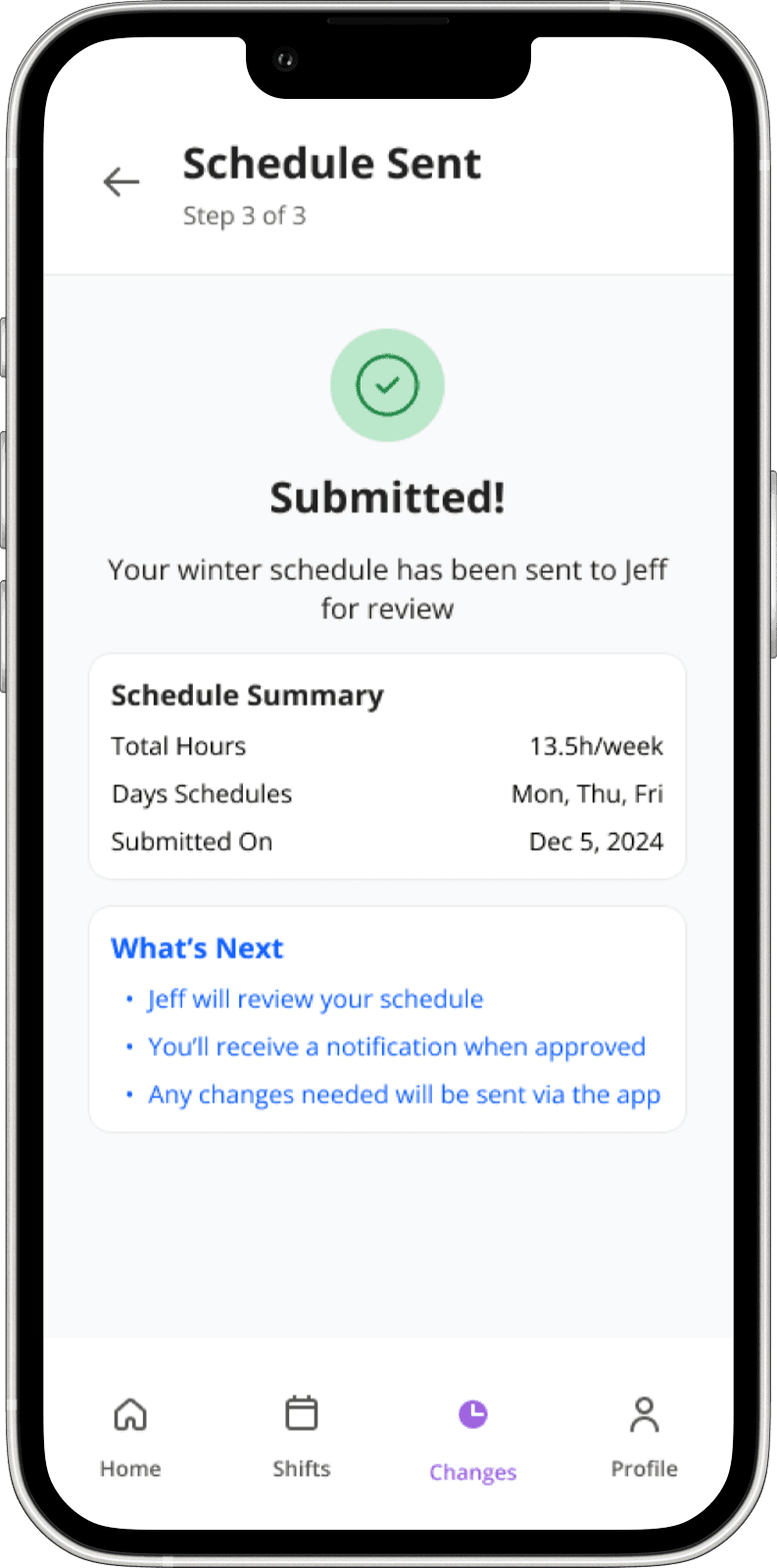
All-in-one app for managing shifts, tracking hours, and handling schedule changes.
All-in-one app for managing shifts, tracking hours, and handling schedule changes.
Calculate weekly hours, submit shifts, and receive approvals or denials directly in-app.
Calculate weekly hours, submit shifts, and receive approvals or denials directly in-app.
Interface displaying key shift details, team members, and their tasks at a glance.
Interface displaying key shift details, team members, and their tasks at a glance.
OBJECTIVES
Measuring Success & Impact
Measuring Success & Impact
Measuring Success & Impact
I defined specific, measurable targets to validate the solutions' effectiveness:
I defined specific, measurable targets to validate the solutions' effectiveness:
I defined specific, measurable targets to validate the solutions' effectiveness:
Quantitative
Quantitative
Quantitative
Cut scheduling admin time in half (56→28 hours quarterly)
Eliminate 90% of schedule-related emails
Achieve universal mobile adoption (60%→100%)
Cut scheduling admin time in half (56→28 hours quarterly)
Eliminate 90% of schedule-related emails
Achieve universal mobile adoption (60%→100%)
Cut scheduling admin time in half (56→28 hours quarterly)
Eliminate 90% of schedule-related emails
Achieve universal mobile adoption (60%→100%)
Qualitative
Qualitative
Qualitative
Drive consistently positive quarterly satisfaction scores
Reach 90% approval rating for schedule visibility
Slash task management complaints by 80%
Build user confidence in schedule accuracy
Drive consistently positive quarterly satisfaction scores
Reach 90% approval rating for schedule visibility
Slash task management complaints by 80%
Build user confidence in schedule accuracy
Drive consistently positive quarterly satisfaction scores
Reach 90% approval rating for schedule visibility
Slash task management complaints by 80%
Build user confidence in schedule accuracy
IDEATION
Early Explorations & Ideation
Early Explorations & Ideation
Early Explorations & Ideation
Armed with research insights, I began by sketching core screens and mapping the user journey. This analog approach allowed me to rapidly explore multiple concepts before committing to digital designs.
Armed with research insights, I began by sketching core screens and mapping the user journey. This analog approach allowed me to rapidly explore multiple concepts before committing to digital designs.
Armed with research insights, I began by sketching core screens and mapping the user journey. This analog approach allowed me to rapidly explore multiple concepts before committing to digital designs.
White-boarding
White-boarding
White-boarding
The whiteboarding phase focused on dashboard layouts that prioritize today's critical information, logical task organization and navigation patterns, and clear decision points and approval workflows.
The whiteboarding phase focused on dashboard layouts that prioritize today's critical information, logical task organization and navigation patterns, and clear decision points and approval workflows.
The whiteboarding phase focused on dashboard layouts that prioritize today's critical information, logical task organization and navigation patterns, and clear decision points and approval workflows.


User Flow
User Flow
User Flow
The resulting user flow established the foundation for a streamlined experience that would address both student and supervisor needs while eliminating unnecessary complexity.
The resulting user flow established the foundation for a streamlined experience that would address both student and supervisor needs while eliminating unnecessary complexity.
The resulting user flow established the foundation for a streamlined experience that would address both student and supervisor needs while eliminating unnecessary complexity.

DESIGN
Creating the brand
Creating the brand
I built on UW's existing design system, adopting their signature purple while creating a cohesive palette that balances productivity and accessibility. The design system includes 3 main features:
I built on UW's existing design system, adopting their signature purple while creating a cohesive palette that balances productivity and accessibility. The design system includes 3 main features:
Brand colors clarify task types and status information with distinct semantic coding
#1
Brand Colors
Husky Purple
#4C2983
Light Purple
#F3E8FF
Remote Orange
#E69138
Light Orange
#FCE5CD
Phone Green
#15803D
Light Green
#EFFFF4
Zoom Blue
#0B5CFF
Light Blue
#EFFFF4
Red
#CC0100
Light Red
#F4CACC
Text & Background
Primary Text
#222222
Secondary Text
#575757
Background
#F9FAFB
Popup
#FFFFFF
Secondary Text
#575757
Background
#F9FAFB
Popup
#FFFFFF
8-point grid system
8px - Minimal
16px - Standard
24px - Medium
32px - Large
48px - Extra Large
8-point grid system creates consistent spacing and alignment for easier scanning
#2
8-point grid system
8px - Minimal
16px - Standard
24px - Medium
32px - Large
48px - Extra Large
8-point grid system creates consistent spacing and alignment for easier scanning
#2
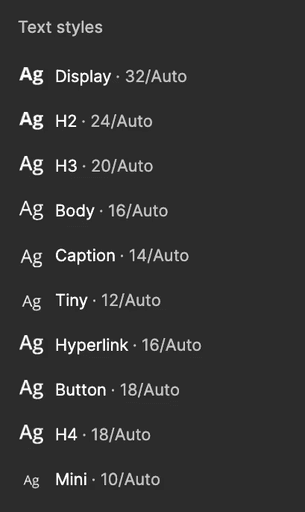
Typography ensures comfortable reading with accessible size hierarchy and strong contrast
#3
Typography ensures comfortable reading with accessible size hierarchy and strong contrast
#3
USABILITY TESTING
Refining Through Feedback
Refining Through Feedback
Refining Through Feedback
User testing revealed critical opportunities for improvement. I made targeted adjustments based on participant insights, resulting in a more intuitive and efficient experience.
User testing revealed critical opportunities for improvement. I made targeted adjustments based on participant insights, resulting in a more intuitive and efficient experience.
User testing revealed critical opportunities for improvement. I made targeted adjustments based on participant insights, resulting in a more intuitive and efficient experience.
#1 - Improved Dashboard Screen
The dashboard underwent significant transformation based on direct user feedback. The initial design provided basic scheduling information, while the revised version offers enhanced functionality and clearer task organization.

Before
After
I elevated the dashboard experience by:
Restructuring information hierarchy to prioritize what matters most
Adding clear visual cues for task timing, duration and location
Creating a swipeable interface for seamless daily/weekly views
Introducing team presence indicators to enhance collaboration
#2 - Nav Bar
#2 - Nav Bar
#2 - Nav Bar
Initial testing uncovered critical navigation confusion. Through three iterative versions and multiple rounds of feedback, I transformed the navigation experience.
Initial testing uncovered critical navigation confusion. Through three iterative versions and multiple rounds of feedback, I transformed the navigation experience.
Initial testing uncovered critical navigation confusion. Through three iterative versions and multiple rounds of feedback, I transformed the navigation experience.

Version 1

Version 2
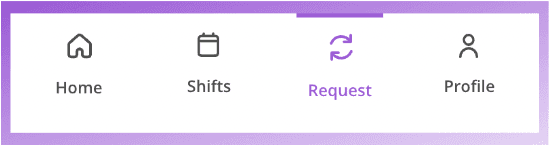
Version 3

Version 3 improved user navigation by:
Version 3 improved user navigation by:
Version 3 improved user navigation by:
Renaming "Changes" to "Request" for clearer shift adjustment function
Adding labels to reduce cognitive load
Implementing purple underline for current location awareness
Renaming "Changes" to "Request" for clearer shift adjustment function
Adding labels to reduce cognitive load
Implementing purple underline for current location awareness
Renaming "Changes" to "Request" for clearer shift adjustment function
Adding labels to reduce cognitive load
Implementing purple underline for current location awareness
DESIGN HIGHLIGHT
Value Dams and Flows
Value Dams and Flows
Beyond usability improvements, the iterative testing process revealed deeper value tensions that required careful design decisions to balance competing stakeholder needs:
Beyond usability improvements, the iterative testing process revealed deeper value tensions that required careful design decisions to balance competing stakeholder needs:
Real-time visibility vs. privacy:
I balanced this by showing supervisors aggregated coverage data without exposing individual student activity in real-time. Students control their own schedule view, and supervisors see operational needs – not surveillance.
Simplicity vs. information density:
I used a swipeable daily/weekly toggle so students get immediacy (today's schedule at a glance) with the option to dive deeper (full week view) when planning ahead.
Speed vs. thoughtfulness:
The approval interface surfaces critical context (requester name, coverage impact, conflicting shifts) directly in the action panel, so supervisors can make informed 15-second decisions rather than rushed ones.
Validation vs. flexibility:
I designed smart validation that flags potential issues but doesn't block submissions, allowing supervisors final judgment.
Real-time visibility vs. privacy:
I balanced this by showing supervisors aggregated coverage data without exposing individual student activity in real-time. Students control their own schedule view, and supervisors see operational needs – not surveillance.
Simplicity vs. information density:
I used a swipeable daily/weekly toggle so students get immediacy (today's schedule at a glance) with the option to dive deeper (full week view) when planning ahead.
Speed vs. thoughtfulness:
The approval interface surfaces critical context (requester name, coverage impact, conflicting shifts) directly in the action panel, so supervisors can make informed 15-second decisions rather than rushed ones.
Validation vs. flexibility:
I designed smart validation that flags potential issues but doesn't block submissions, allowing supervisors final judgment.
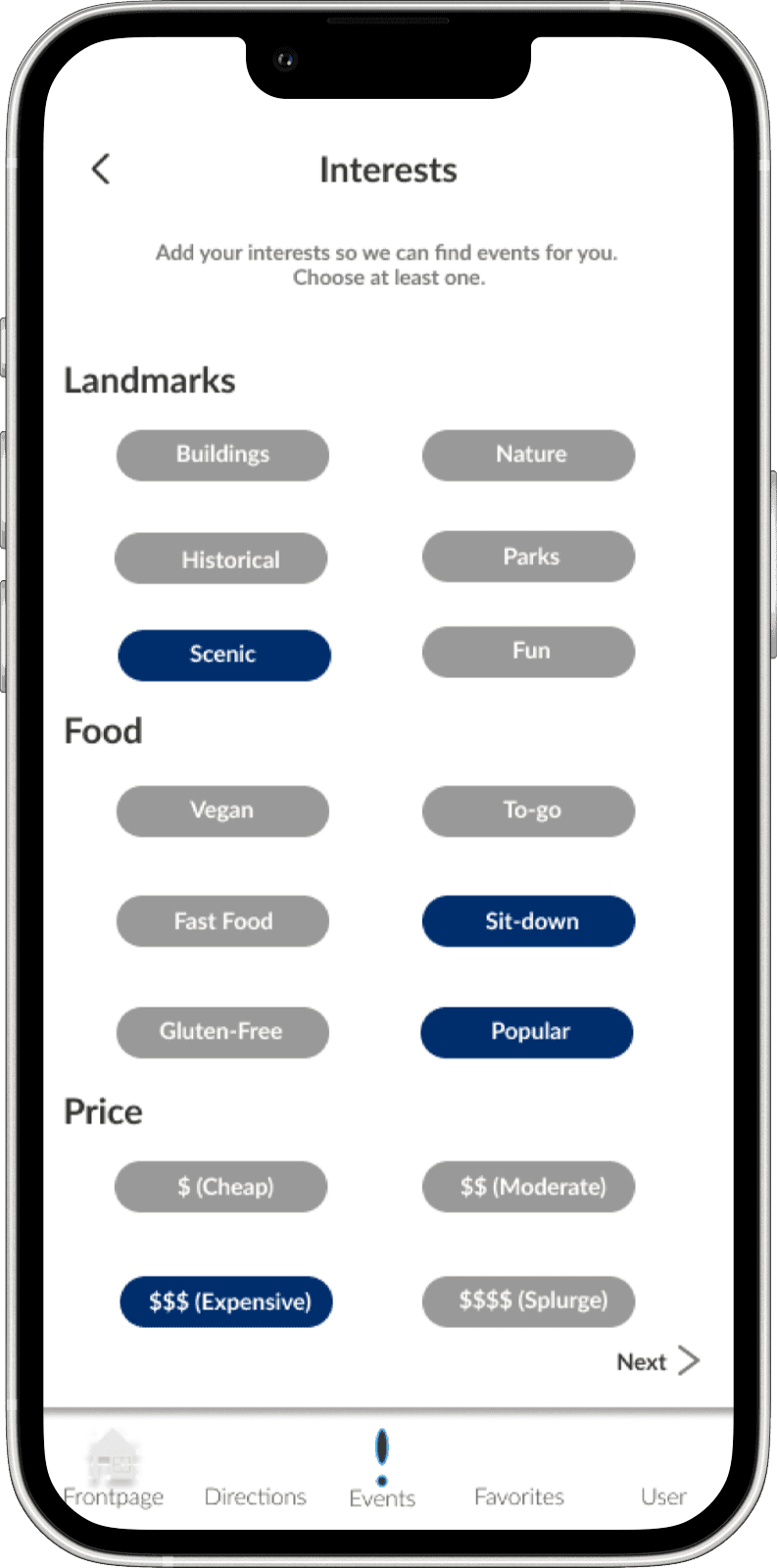
#1 - Improved Interest Filtering Screen
#1 - Improved Dashboard Screen
#1 - Improved Dashboard Screen
User testing revealed that participants found the original toggle interface overwhelming. The subtle color contrast between selected and unselected states created uncertainty, with users frequently losing track of their choices.
The dashboard underwent significant transformation based on direct user feedback. The initial design provided basic scheduling information, while the revised version offers enhanced functionality and clearer task organization.
The dashboard underwent significant transformation based on direct user feedback. The initial design provided basic scheduling information, while the revised version offers enhanced functionality and clearer task organization.
Before
Before
Before

After
After
After

We reimagined the interest selection interface with:
Colorful, distinct icons for each category
Larger, more visually engaging buttons
Clear labeling and visual hierarchy
Progress indicator at the top
Limited selection (up to 5) to prevent choice overload
I elevated the dashboard experience by:
Restructuring information hierarchy to prioritize what matters most
Adding clear visual cues for task timing, duration and location
Creating a swipeable interface for seamless daily/weekly views
Introducing team presence indicators to enhance collaboration
I elevated the dashboard experience by:
Restructuring information hierarchy to prioritize what matters most
Adding clear visual cues for task timing, duration and location
Creating a swipeable interface for seamless daily/weekly views
Introducing team presence indicators to enhance collaboration
FINALIZED DESIGNS
The Final Product
The Final Product
The Final Product


REFLECTION
Tripartite Methodology Framing
Tripartite Methodology Framing
Tripartite Methodology Framing
Conceptual: I investigated the values at stake which include: autonomy, efficiency, fairness, work-life balance. For these values I explored how they applied to this scheduling context. I also considered the meaning of "good" schedule visibility and what it means for a system to respect users' time.
Empirical: My interviews and surveys gathered real-world data on how stakeholders experienced the current system and what they valued. My usability testing provided empirical feedback on whether my designs supported those values.
Technical: I investigated the material properties of mobile interfaces (touch targets, contrast ratios, information hierarchy) and how they could support or hinder the values I identified. My accessibility considerations (4.5:1 contrast, 44x44pt touch targets, 12px minimum text) are technical choices that support the value of inclusivity.
Conceptual: I investigated the values at stake which include: autonomy, efficiency, fairness, work-life balance. For these values I explored how they applied to this scheduling context. I also considered the meaning of "good" schedule visibility and what it means for a system to respect users' time.
Empirical: My interviews and surveys gathered real-world data on how stakeholders experienced the current system and what they valued. My usability testing provided empirical feedback on whether my designs supported those values.
Technical: I investigated the material properties of mobile interfaces (touch targets, contrast ratios, information hierarchy) and how they could support or hinder the values I identified. My accessibility considerations (4.5:1 contrast, 44x44pt touch targets, 12px minimum text) are technical choices that support the value of inclusivity.
Conceptual: I investigated the values at stake which include: autonomy, efficiency, fairness, work-life balance. For these values I explored how they applied to this scheduling context. I also considered the meaning of "good" schedule visibility and what it means for a system to respect users' time.
Empirical: My interviews and surveys gathered real-world data on how stakeholders experienced the current system and what they valued. My usability testing provided empirical feedback on whether my designs supported those values.
Technical: I investigated the material properties of mobile interfaces (touch targets, contrast ratios, information hierarchy) and how they could support or hinder the values I identified. My accessibility considerations (4.5:1 contrast, 44x44pt touch targets, 12px minimum text) are technical choices that support the value of inclusivity.
REFLECTION
Learnings and Future Plans
Learnings and Future Plans
Learnings and Future Plans
One of the most fruitful parts of this project has been learning about the ways product informs design and vice versa. Moving forward, I'm most curious to see how new problems within the space I want to explore will continue to evolve my design.
One of the most fruitful parts of this project has been learning about the ways product informs design and vice versa. Moving forward, I'm most curious to see how new problems within the space I want to explore will continue to evolve my design.
One of the most fruitful parts of this project has been learning about the ways product informs design and vice versa. Moving forward, I'm most curious to see how new problems within the space I want to explore will continue to evolve my design.
What I Learned
What I Learned
What I Learned
This redesign challenged me to balance complex workflows with an intuitive interface. Through the process, I gained valuable insights:
This redesign challenged me to balance complex workflows with an intuitive interface. Through the process, I gained valuable insights:
This redesign challenged me to balance complex workflows with an intuitive interface. Through the process, I gained valuable insights:
#1
#1
#1
Research Drives Outcomes
Research Drives Outcomes
Research Drives Outcomes
Deep user insights led directly to meaningful solutions that addressed real pain points rather than surface-level symptoms.
Deep user insights led directly to meaningful solutions that addressed real pain points rather than surface-level symptoms.
Deep user insights led directly to meaningful solutions that addressed real pain points rather than surface-level symptoms.
#2
#2
#2
Iterative Testing Works
Iterative Testing Works
Iterative Testing Works
Multiple feedback cycles transformed good designs into great ones, particularly with navigation and dashboard elements.
Multiple feedback cycles transformed good designs into great ones, particularly with navigation and dashboard elements.
Multiple feedback cycles transformed good designs into great ones, particularly with navigation and dashboard elements.
#3
#3
#3
Simplicity Wins
Simplicity Wins
Simplicity Wins
Ruthlessly prioritizing features based on impact-effort analysis ensured we built the right solution rather than the most complex one.
Ruthlessly prioritizing features based on impact-effort analysis ensured we built the right solution rather than the most complex one.
Ruthlessly prioritizing features based on impact-effort analysis ensured we built the right solution rather than the most complex one.
What's Next?
What's Next?
What's Next?
While Daisy has significantly improved the scheduling experience, there's still more to explore:
While Daisy has significantly improved the scheduling experience, there's still more to explore:
While Daisy has significantly improved the scheduling experience, there's still more to explore:
How might I integrate predictive scheduling to anticipate staffing needs?
How might I integrate predictive scheduling to anticipate staffing needs?
How might I integrate predictive scheduling to anticipate staffing needs?
What additional mobile features would benefit supervisors who are frequently away from their desks?
What additional mobile features would benefit supervisors who are frequently away from their desks?
What additional mobile features would benefit supervisors who are frequently away from their desks?
How could I expand this solution to other university departments with similar challenges?
How could I expand this solution to other university departments with similar challenges?
How could I expand this solution to other university departments with similar challenges?
What analytics could help leadership make better long-term staffing decisions?
What analytics could help leadership make better long-term staffing decisions?
What analytics could help leadership make better long-term staffing decisions?
Jonathan To
© 2024 Jonathan To Site. All rights reserved.